
Flows
The canvas, the templates worth starting from, running a flow in the Playground, and reading what a run actually did.
A flow is one pipeline. You build it by dragging components onto a canvas and connecting them. Each component does one thing and has typed inputs and outputs, so a connection either makes sense or the canvas refuses to make it.
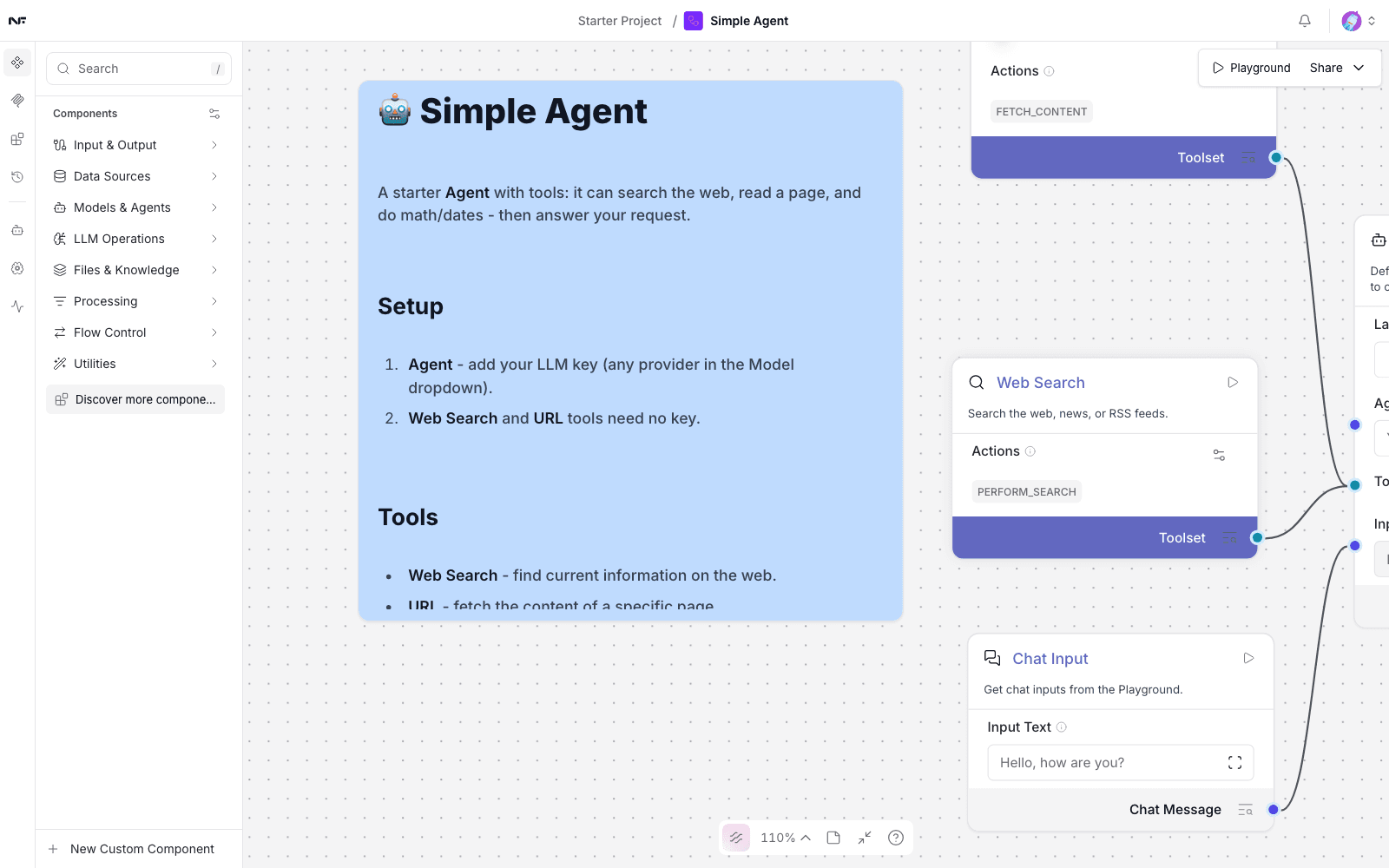
The canvas
| Where | What |
|---|---|
| Left rail | Components, MCP, Bundles — what you can add |
| Top right | Playground to run it, Share to publish it |
| Top bar | Versions, Agent, Memories, Traces |
| Bottom | Zoom, fit-to-view, and the help entry |
Nothing runs as you edit. A flow executes only when you run it.
Starting from a template
Starting blank is rarely the fastest route. A new flow offers:
- Simple Agent — a chat input, an agent with web search and URL fetch, and an output. The best starting point for "answer a question, using tools".
- Vector Store RAG — the retrieval pipeline: load, split, embed, store, retrieve, answer.
- Browse more… — the full template library.
Templates arrive wired, which means you can run one immediately and take it apart to see why it works. A template's own notes appear as a panel on the canvas; the Simple Agent's first instruction is "add your LLM key (any provider in the Model dropdown)".
Templates do not pick a working model for you. Set the Agent component's model before the first run — see Connect a model.
Running a flow
Playground opens a chat against the flow. Type, send, and watch.
A finished run shows the answer with the time it took:
AI ✓ Finished in 9.4sEach component on the canvas also picks up its own timing as the run
passes through it — Chat Input 56ms and so on. That is the fastest way
to see where a slow flow spends itself.
Sessions on the left of the Playground keep separate conversations against the same flow, which is how you test a change without the previous exchange colouring the result.
Reading a failed run
A failure appears in the Playground as a collapsed row — "An error occurred" with a chevron. Expand it: the underlying message is usually specific even when the summary is not.
The most common cause by far is a model that no longer exists. See Troubleshooting.
Versions
Versions keeps the history of a flow. Before a substantial edit it is worth knowing it is there — restoring is faster than reconstructing.
Projects
Flows live in projects, listed down the left of the home screen. A new account has a Starter Project; the + beside the heading makes another. Projects are organisational only — a flow in one is not isolated from a flow in another.